
Playwright vs Cypress: Complete 2026 Comparison for Automation Testing
Playwright vs Cypress is one of the most common questions asked by testers, developers, QA engineers, and beginners who want to learn modern web automation testing.
Both Playwright and Cypress can automate web applications and perform end-to-end testing. Both support modern web applications, automatic waiting, assertions, screenshots, network testing, and CI/CD workflows.
However, Playwright and Cypress follow different approaches to browser testing.
Table of Contents
ToggleThe biggest differences appear when you need multiple browsers, multiple tabs, multiple users, different programming languages, parallel execution, API testing, debugging, component testing, or large CI/CD test suites.
In this guide, we will compare Playwright vs Cypress step by step in simple language so even a beginner can understand the difference.
Quick answer: Playwright and Cypress are both capable automation testing tools. Playwright is particularly useful when you need broad browser coverage, complex browser workflows, multiple languages, and built-in parallel test execution. Cypress is particularly useful when your team wants an interactive browser-based development experience and strong component testing.
The right choice depends on your application, team, testing requirements, and existing automation framework.
If you choose Playwright and want guided practice, explore our Playwright course in Hyderabad.
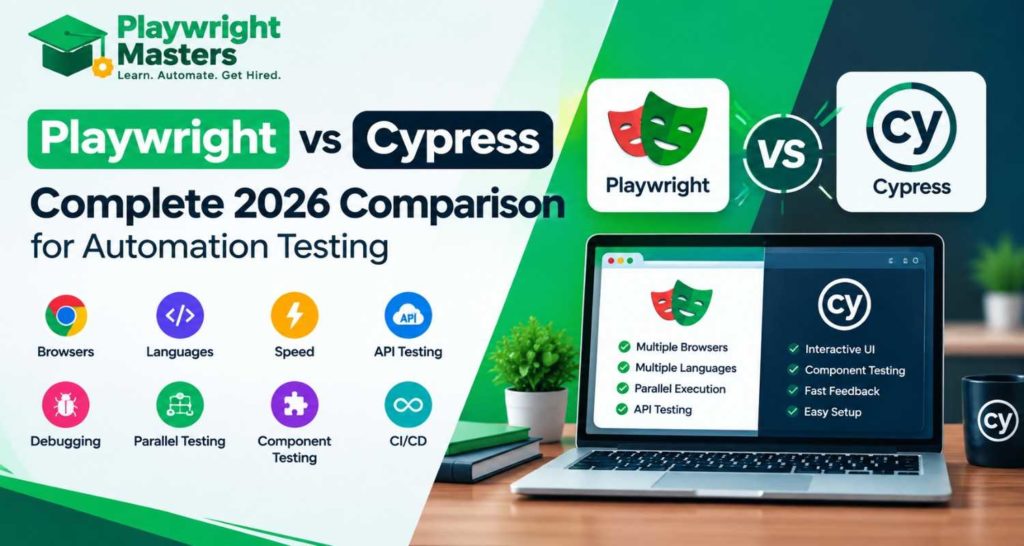
Playwright vs Cypress: Practical Comparison
What are you trying to do? | Playwright | Cypress |
Start browser automation | Lets you control browsers directly through Playwright APIs and create automated user journeys. | Lets you write tests around web applications using Cypress commands and its test runner. |
Test a login flow | You can open the application, enter credentials, maintain session state, and continue testing authenticated pages. | Cypress lets you automate the sign-in process and preserve the required login state for subsequent tests. |
Work with several browser tabs | Supports multiple pages in the same browser session, making tab and popup workflows easier to model. | Multi-tab scenarios require a different approach because Cypress is designed around its own browser interaction model. |
Test different users at the same time | Browser contexts can represent separate users with independent cookies, storage, and sessions. | Cypress handles test isolation differently and does not use Playwright-style browser contexts. |
Check a popup or new page | Provides APIs for waiting for and interacting with newly opened pages or popups. | Popup and multi-window scenarios are handled differently from traditional browser automation tools. |
Run the same test on different browser engines | A single Playwright project can target Chromium, Firefox, and WebKit. | Cypress supports several browsers, but its browser support model is different from Playwright’s browser-engine approach. |
Use Python for automation | Python is available as an official Playwright language binding. | Cypress tests are written using its JavaScript/TypeScript-based ecosystem. |
Build automation tests with Java | Playwright lets you create and run automation tests using Java. | Cypress does not provide a Java test API. |
Use C# / .NET | Playwright has .NET support. | Cypress does not provide a .NET test API. |
Combine UI and API checks | Browser actions and API requests can be used together in the same Playwright testing ecosystem. | Cypress also provides API-oriented commands that can be combined with application testing. |
Fake backend responses | Network requests can be intercepted and responses can be modified or supplied by the test. | Cypress provides request interception and stubbing capabilities for controlled test scenarios. |
Investigate a failed test later | Trace recording can capture information such as actions, network activity, screenshots, and other test details for investigation. | The interactive runner and command log help developers inspect what happened during test execution. |
Develop tests interactively | UI Mode provides a visual way to explore, run, and debug Playwright tests. | Cypress’s interactive runner is central to its development and debugging experience. |
Run many tests simultaneously | Playwright Test supports workers and parallel test execution. | Cypress supports parallelization through its supported test-running and cloud workflow. |
Test responsive layouts | Device profiles and browser settings can be used to reproduce different viewport and device conditions. | Cypress can also test different viewport sizes and browser environments. |
Build a large E2E suite | Provides features such as fixtures, projects, retries, parallel workers, traces, and browser contexts for larger automation setups. | Provides a structured testing environment with commands, assertions, fixtures, retries, and its interactive runner. |
Frontend component testing | Playwright has component-testing capabilities for supported frameworks. | Cypress has a dedicated component-testing workflow alongside E2E testing. |
Run tests in CI | Playwright tests can be executed from CI pipelines and combined with common development workflows. | Cypress supports running tests in CI pipelines and can be connected with tools in its testing ecosystem. |
Learn browser automation concepts | Good for learning concepts such as locators, pages, contexts, fixtures, network interception, authentication, and tracing. | Useful for learning application testing through Cypress commands, assertions, intercepts, and its interactive runner. |
Choose based on project requirements | Often considered when broad browser automation and complex end-to-end workflows are important. | Often considered when an interactive testing experience and frontend-oriented testing workflow are priorities. |
Browser support and feature details can change as both projects release new versions, so always verify the current documentation before designing a long-term test strategy. Playwright currently documents Chromium, Firefox, WebKit and branded browsers such as Chrome and Edge, while Cypress documents Chrome-family browsers, Firefox and experimental WebKit support.
What Is Playwright?
Microsoft developed Playwright as an open-source tool that lets you automate actions and tests in web browsers.
It helps developers and testers build reliable tests and automate modern web applications across different browsers.
With Playwright, you can automate actions such as:
- Opening a website
- Clicking buttons
- Filling forms
- Selecting dropdowns
- Uploading files
- Downloading files
- Handling popups
- Working with multiple tabs
- Handling authentication
- Testing APIs
- Mocking network responses
- Taking screenshots
- Recording traces
- Running tests across browsers
- Running tests in parallel
You can build Playwright automation scripts with several programming languages, including JavaScript, TypeScript, Python, Java, and .NET.
Its official documentation provides language-specific options and testing integrations.
A simple Playwright workflow looks like this:
Open browser → Open page → Find element → Perform action → Check result
For example:
Open login page
↓
Enter username
↓
Enter password
↓
Click Login
↓
Verify dashboard
That is end-to-end testing.
You can learn the fundamentals through the Playwright Masters syllabus, which covers Playwright from installation and locators through framework development, API testing and advanced automation.
What Is Cypress?
Cypress is a web testing framework designed around a highly interactive browser-based testing experience.
Cypress supports:
- End-to-end testing
- Component testing
- Browser automation
- Assertions
- Network interception
- Screenshots
- Videos
- Debugging
- CI/CD testing
- Cross-browser testing
One of the important characteristics of Cypress is its interactive development experience.
When you open the Cypress application, you can see your test running in a browser and inspect what happened during individual steps. Cypress describes its application as a real-browser environment with automatic reruns and step-by-step inspection.
Cypress also has a dedicated component-testing workflow where components are mounted directly in a real browser.
Playwright vs Cypress: The Biggest Difference
If you remember only one concept from this entire article, remember this:
Playwright and Cypress use different approaches to browser automation.
Playwright controls browsers from outside the web page.
Cypress operates its test experience much closer to the application inside the browser.
You do not need to understand the technical architecture immediately.
Think about it like this.
Imagine a classroom.
Cypress
The teacher is sitting inside the classroom with the students and can immediately see what is happening.
Playwright
The teacher is controlling the classroom from outside and has broader control over different classrooms, rooms and activities.
This architectural difference affects how the tools handle:
- Tabs
- Windows
- Multiple origins
- Browser contexts
- Network activity
- Browser control
- Test isolation
- Complex workflows
This is why simply asking “Which tool is faster?” is not enough.
The better question is:
Which testing framework matches the application and testing problems I need to solve?
Playwright vs Cypress: Browser Support
Browser coverage is one of the most important differences.
Playwright supports:
- Chromium
- Firefox
- WebKit
- Google Chrome
- Microsoft Edge
- Mobile device emulation
Playwright projects can be configured to run the same test against different browser configurations.
Cypress supports:
- Chrome-family browsers
- Edge
- Firefox
- WebKit experimentally
Cypress’s current documentation explicitly lists WebKit as experimental.
Why does this matter?
Imagine your website works perfectly in Chrome.
Does that automatically mean it works perfectly in Firefox?
No.
Does it automatically mean it behaves correctly in Safari?
No.
Different browser engines can behave differently.
For applications where WebKit/Safari-engine coverage is important, Playwright provides a particularly straightforward option because WebKit is one of its supported browser engines.
Playwright vs Cypress: Programming Languages
Playwright supports:
- JavaScript
- TypeScript
- Python
- Java
- .NET
Cypress primarily targets:
- JavaScript
- TypeScript
Playwright’s official documentation confirms support for JavaScript/TypeScript, Python, Java and .NET.
Which matters for you?
Suppose your company has:
Frontend team → TypeScript
Backend team → Java
QA team → Python
Playwright can fit into multiple language environments.
If your entire team already works with JavaScript or TypeScript, Cypress can fit naturally into that ecosystem.
So language support is not automatically a reason to reject either tool.
It depends on your team.
Playwright vs Cypress: Syntax
The programming style is noticeably different.
Playwright example
import { test, expect } from '@playwright/test';

test('login test', async ({ page }) => {
  await page.goto('https://example.com/login');

  await page.getByLabel('Email').fill('user@example.com');

  await page.getByLabel('Password').fill('password');

  await page.getByRole('button', { name: 'Login' }).click();

  await expect(page).toHaveURL(/dashboard/);
});
Notice the use of:
async
await
Playwright uses an async/await programming model.
Cypress example
describe('Login Test', () => {
  it('logs in successfully', () => {
    cy.visit('https://example.com/login');

    cy.get('[data-testid="email"]').type('user@example.com');

    cy.get('[data-testid="password"]').type('password');

    cy.get('[data-testid="login"]').click();

    cy.url().should('include', '/dashboard');
  });
});
Cypress uses its command-chain model.
Neither syntax is automatically “better.”
The important question is:
Which programming model is easier for your team to understand, maintain and debug?
Playwright vs Cypress: Auto-Waiting
Modern websites are not instant.
Imagine you click:
Login
The dashboard may take one second to appear because an API request is still running.
A beginner might write:
wait(5000);
That means:
“Pause for five seconds and assume the page has finished loading.”
This is usually not the best strategy.
Modern automation frameworks provide mechanisms to wait for application conditions.
Playwright performs actionability checks before actions on locators, helping actions wait until the element is ready.
Cypress also provides automatic waiting and retry behavior.
Better testing mindset
Do not think:
“Wait for five seconds.”
Think:
“Wait until the required element or action is ready to continue.”
This produces more meaningful and maintainable automation.
Playwright vs Cypress: Multiple Tabs and Windows
Modern applications may open:
- New tabs
- Popups
- Payment pages
- Authentication windows
- External websites
Playwright has strong support for pages, browser contexts, popups and multi-page workflows.
For example:
Main website
↓
Click payment
↓
Payment page opens
↓
Complete payment
↓
Return to application
↓
Verify order
This type of workflow is an important consideration when choosing a browser automation architecture.
Cypress can handle many modern browser workflows, but its architecture imposes different constraints around browser control and multi-page scenarios.
If your application frequently uses multiple tabs, popups or complex browser workflows, evaluate this requirement before choosing your framework.
Playwright vs Cypress: Browser Contexts
One of Playwright’s important concepts is the BrowserContext.
Think about it like this:
Browser
   |
   +--- Context A → User A
   |
   +--- Context B → User B
Each context can have isolated browser state.
This can be useful when testing:
- Multiple users
- Different accounts
- Authentication
- Cookies
- Sessions
- Roles
- Permissions
For example:
Admin
↓
Creates user
User
↓
Logs in
Admin
↓
Checks user
User
↓
Uses application
These types of workflows become important in real-world enterprise testing.
Playwright vs Cypress: Parallel Testing
Suppose you have 1,000 tests.
Executing each test separately can significantly increase the overall testing time.
Parallel testing means multiple tests can execute at the same time.
Think about washing 100 dishes.
One person washing them one by one takes longer.
Ten people can work at the same time.
Automation works similarly.
Playwright Test runs tests using worker processes and supports configurable parallel execution.
For example:
Worker 1 → Test 1, Test 2
Worker 2 → Test 3, Test 4
Worker 3 → Test 5, Test 6
Worker 4 → Test 7, Test 8
This becomes particularly useful in CI/CD environments.
Cypress can run multiple tests at the same time using its available parallelization features and cloud-based testing workflows.
When comparing parallel execution, do not look only at whether the feature exists.
Look at:
- How tests are distributed
- How CI machines are managed
- How results are collected
- Whether orchestration requires a paid service
- How your organization wants to manage infrastructure
Playwright vs Cypress: Debugging
Debugging means finding out:
Why did my test fail?
This is one of the most important parts of automation.
A test that runs quickly but is difficult to debug can still create a lot of maintenance work.
Playwright Trace Viewer
Playwright provides Trace Viewer.
A trace can help you inspect what happened during a test, including actions and DOM snapshots. Playwright specifically documents Trace Viewer as a tool for investigating failures, including CI failures.
You can record traces and inspect them later.
That is extremely useful for failures that happen only in CI.
For example:
Test failed at 2:00 AM
↓
Developer opens trace
↓
Sees previous actions
↓
Checks DOM snapshot
↓
Finds failed action
↓
Fixes test
Cypress Debugging
Cypress has a strong interactive debugging experience.
Its application lets developers watch tests execute and inspect previous steps through its interactive runner.
Simple difference
Cypress: excellent interactive local debugging experience.
Playwright: strong debugging through UI Mode, traces and recorded test information.
Your team’s debugging workflow should be part of the decision.
Playwright vs Cypress: API Testing
Modern applications depend heavily on APIs.
For example:
Frontend
↓
API
↓
Database
A UI test might create a user by filling ten fields.
An API test may create the same user much faster.
Playwright provides API request capabilities that can be used alongside browser testing.
This allows a hybrid workflow:
API → Create test data
↓
UI → Open application
↓
UI → Verify data
This can reduce unnecessary UI setup and make complex test suites more efficient.
Cypress also supports API requests through its API testing capabilities.
So both tools can test APIs.
The more important question is how naturally API testing fits into your overall automation architecture.
Playwright vs Cypress: Network Mocking
Imagine your application calls:
GET /api/products
Normally the real server returns the products.
But what if you want to test:
500 Server Error
or:
No products found
or:
Very slow response
Network mocking allows you to simulate these conditions.
Playwright provides network interception capabilities.
Cypress provides network interception through its own API.
This is extremely useful for testing error conditions that are difficult to reproduce using real backend systems.
Playwright vs Cypress: Component Testing
This is an area where Cypress has a strong focus.
Cypress Component Testing mounts UI components directly in a real browser and allows developers to interact with and inspect them.
For example:
Button
Card
Login Form
Navigation Menu
Product Component
can be tested individually.
This is different from testing an entire application journey.
Example
Instead of:
Open website
→ Login
→ Open product
→ Add product
→ Checkout
component testing may focus only on:
ProductCard
and verify:
- Product name
- Price
- Image
- Button
- Disabled state
- Click behavior
If component testing is a major part of your frontend team’s strategy, Cypress deserves serious consideration.
Playwright vs Cypress: CI/CD
Automation becomes much more valuable when it runs automatically.
A typical CI/CD workflow looks like:
Developer pushes code
↓
GitHub
↓
CI pipeline starts
↓
Application builds
↓
Automated tests run
↓
Tests pass
↓
Deployment continues
Both Playwright and Cypress can be integrated into CI/CD systems.
Playwright’s test runner provides parallel workers and supports running tests headlessly, which is useful for CI environments.
A mature automation setup should consider:
- Test parallelization
- Retries
- Reports
- Screenshots
- Traces
- Test artifacts
- Environment variables
- Secrets
- Browser versions
- Failure notifications
The tool is only one part of the CI/CD solution.
Playwright vs Cypress: Learning Curve
For a complete beginner, Cypress can feel easier at first because its interactive runner gives immediate visual feedback.
Playwright may require understanding more concepts such as:
- async/await
- Browser
- BrowserContext
- Page
- Locators
- Fixtures
- Projects
- Workers
- Configuration
But these concepts become valuable as your automation framework grows.
If you are completely new to coding, do not try to learn 100 Playwright commands at once.
Start with:
JavaScript basics
↓
HTML + DOM
↓
Playwright installation
↓
Locators
↓
Actions
↓
Assertions
↓
Auto-waiting
↓
Real project
Our Playwright Roadmap 2026 follows this kind of progression from fundamentals to framework development, API testing, CI/CD and projects.
Playwright vs Cypress: Which Is Better for Beginners?
There is no universal answer.
If you are a beginner who wants to learn Playwright
Start with:
- HTML basics
- CSS basics
- JavaScript
- TypeScript basics
- Async/await
- Playwright installation
- Locators
- Actions
- Assertions
- Auto-waiting
- Page Object Model
- API testing
- Git
- CI/CD
Do not start with advanced framework architecture on day one.
First learn how one test works.
Then learn how 100 tests can be organized.
Playwright vs Cypress: Which Is Better for Large Projects?
For a large automation project, compare the tools based on your actual requirements.
Ask:
1. Do we need multiple browser engines?
If yes, browser coverage becomes important.
2. Do we need multiple tabs and complex browser workflows?
If yes, evaluate each tool against real application scenarios.
3. Do we need multiple programming languages?
If yes, Playwright has broader official language support.
4. Do we need large-scale parallel execution?
Evaluate worker, sharding and CI infrastructure requirements.
5. Do we need component testing?
If yes, compare Cypress’s component-testing workflow with your Playwright requirements.
6. How will developers debug failures?
Run a real proof of concept.
7. What does the team already know?
A technically capable tool can still be expensive to adopt if the team has to relearn everything.
Playwright vs Cypress: Speed
You will find many articles claiming:
“Playwright is X% faster.”
Be careful with universal speed claims.
Test execution speed depends on:
- Application
- Test design
- Number of tests
- Browser
- Hardware
- Network
- API dependencies
- Parallel workers
- CI infrastructure
- Test isolation
- Waiting strategy
A benchmark from one application does not automatically represent your application.
Instead of asking:
“Which tool is always faster?”
ask:
“Which tool gives us acceptable execution time for our actual test suite?”
Build a small proof of concept.
Run the same workflows.
Measure:
Total execution time
Failed tests
Flaky tests
CPU usage
CI cost
Debugging time
Maintenance effort
That gives you useful engineering evidence.
Playwright vs Cypress: Flaky Tests
A flaky test sometimes passes and sometimes fails without a real application change.
Example:
Run 1 → PASS
Run 2 → FAIL
Run 3 → PASS
Run 4 → PASS
Run 5 → FAIL
This is dangerous because the team stops trusting the automation.
Common causes include:
- Poor locators
- Fixed waits
- Shared test state
- Race conditions
- Unstable test data
- Network dependency
- Environment problems
- Incorrect synchronization
Neither Playwright nor Cypress magically eliminates all flaky tests.
Good test design matters.
Use:
- Stable locators
- Meaningful assertions
- Proper test isolation
- Reliable test data
- Application-state synchronization
- Good CI practices
The goal is not simply:
“Make the test pass.”
The goal is:
“Make the test trustworthy.”
Playwright vs Cypress: Real-World Example
Imagine you are testing an online shopping website.
A customer:
Opens website
↓
Logs in
↓
Searches for laptop
↓
Opens product
↓
Adds product to cart
↓
Applies coupon
↓
Goes to checkout
↓
Uses payment provider
↓
Returns to website
↓
Confirms order
Now ask:
Requirement 1
Does the test need multiple browser engines?
If yes, browser support matters.
Requirement 2
Does payment open another page?
Browser workflow support matters.
Requirement 3
Do you have 2,000 regression tests?
Parallel execution matters.
Requirement 4
Does the team use Python?
Language support matters.
Requirement 5
Do frontend developers need component testing?
Component testing matters.
Requirement 6
Do CI failures happen occasionally?
Debugging and trace capabilities matter.
This is how a professional automation engineer should compare tools.
Not by choosing the framework with the biggest feature list.
Playwright vs Cypress: Pros and Cons
Playwright Advantages
- Chromium, Firefox and WebKit support
- Multiple programming languages
- Strong multi-page workflows
- Browser contexts
- Built-in Playwright Test runner
- Parallel test execution
- API testing
- Network interception
- Trace Viewer
- Mobile device emulation
- Strong CI/CD capabilities
- Good support for large automation suites
Playwright’s browser and language capabilities are documented by the official project.
Playwright Considerations
- Beginners need to understand async/await
- More framework concepts can appear as projects become advanced
- Large frameworks still require good architecture
- Poorly designed tests can still become flaky
Cypress Advantages
- Interactive test runner
- Strong visual debugging experience
- JavaScript/TypeScript workflow
- E2E testing
- Component testing
- Network interception
- Automatic retry behavior
- Good developer experience
- CI/CD support
Cypress’s documentation emphasizes both E2E and component testing and its interactive browser workflow.
Cypress Considerations
- Primarily JavaScript/TypeScript
- WebKit support is currently experimental
- Complex multi-page/browser workflows need careful evaluation
- Large-scale CI architecture should be evaluated based on your team’s requirements
Playwright vs Cypress: Which One Should You Learn?
If your goal is to become a modern automation tester, do not learn a framework only because someone says it is “the best.”
Learn the engineering concepts behind the framework.
You should understand:
Testing
↓
Programming
↓
Browser automation
↓
Locators
↓
Assertions
↓
Synchronization
↓
Framework design
↓
API testing
↓
CI/CD
↓
Debugging
Once you understand those concepts, moving between automation tools becomes easier.
For someone specifically targeting Playwright automation, a structured learning path can be useful. You can follow the Playwright syllabus and Playwright roadmap to build these skills progressively.
Playwright vs Cypress: Final Comparison
The answer depends on your requirements.
Consider Playwright when you need:
- Chromium + Firefox + WebKit
- Multiple programming languages
- Complex browser workflows
- Multiple tabs and pages
- Browser contexts
- Large E2E suites
- Built-in parallel workers
- API + UI testing
- Network interception
- Trace-based debugging
- Strong CI/CD automation
Consider Cypress when you need:
- JavaScript/TypeScript testing
- Highly interactive local test development
- Visual debugging
- E2E testing
- Component testing
- Frontend-focused workflows
- A browser-centered developer experience
The important point is this:
Playwright is not automatically the correct choice for every project, and Cypress is not automatically the correct choice for every project.
Your application’s architecture should decide.
For a new project, build a small proof of concept with both tools if the decision is important.
Test your real workflows.
Measure the results.
Then choose based on evidence.
Conclusion: Playwright vs Cypress
The Playwright vs Cypress comparison is not simply about finding a winner.
It is about understanding what your testing team actually needs.
If your application requires broad browser coverage, complex browser interactions, multiple languages, browser contexts, API testing and scalable parallel execution, Playwright provides capabilities that can fit those requirements.
If your frontend team values an interactive browser-based testing workflow and strong component testing, Cypress provides a compelling development experience.
The smartest approach is simple:
Understand your requirements → Build a proof of concept → Test real workflows → Measure execution and maintenance → Choose your framework.
And remember:
A good automation framework is not the one with the most features. It is the one your team can use to create reliable, maintainable and trustworthy tests.
Playwright vs Cypress: Frequently Asked Questions
1. What is the difference between Playwright and Cypress?
Playwright and Cypress are both web testing frameworks, but their architectures and testing workflows differ. Playwright provides broad browser and language support and strong capabilities for complex browser automation. Cypress focuses heavily on an interactive browser-based developer experience and provides E2E and component testing.
2. Is Playwright better than Cypress?
There is no universal answer.
Playwright can be a strong fit when you need WebKit, multiple programming languages, complex browser workflows, browser contexts and large parallel test suites.
Cypress can be a strong fit when your team prioritizes its interactive runner and component-testing workflow.
The correct choice depends on your requirements.
3. Is Playwright faster than Cypress?
Execution speed depends on the test suite, application, browser, hardware, CI configuration, parallelism and test design.
Instead of trusting one benchmark, compare both tools using the same application and workflows.
4. Is Playwright easier than Cypress?
Many beginners find Cypress’s interactive runner easy to understand initially.
Playwright requires concepts such as async/await, BrowserContext, fixtures and test configuration.
However, learning these concepts can be valuable when building larger automation frameworks.
5. Does Playwright support Firefox?
Yes.
Playwright supports Chromium, Firefox and WebKit.
6. Does Playwright support Safari?
Playwright supports WebKit, the browser engine associated with Safari. It can also emulate mobile devices and Safari-like environments.
Remember that testing WebKit is not exactly the same thing as testing every version of Safari on every real Apple device.
7. Does Cypress support Firefox?
Yes.
Cypress supports Firefox along with Chrome-family browsers.
8. Does Cypress support WebKit?
Yes, but Cypress currently documents WebKit support as experimental.
9. Can Playwright test APIs?
Yes.
Playwright provides API request capabilities, allowing API testing to be combined with browser automation.
10. Can Cypress test APIs?
Yes.
Cypress provides API request capabilities that can be used to test backend endpoints and combine API setup with UI testing.
11. Can Playwright run tests in parallel?
Yes.
Playwright Test uses worker processes to run tests in parallel and allows the number of workers to be configured.
12. Does Cypress support parallel testing?
Yes.
Cypress supports parallel execution through its testing and CI/CD ecosystem. Your team should evaluate the exact orchestration, CI infrastructure and reporting requirements for your project.
13. Which is better for multiple tabs: Playwright or Cypress?
Playwright is particularly suitable for applications that require multiple pages, tabs and complex browser workflows.
If multiple tabs and popups are a major requirement, test this scenario during your proof of concept rather than relying only on a feature checklist.
14. Which is better for component testing?
Cypress has a mature component-testing workflow where components are mounted in a real browser and tested interactively.
If component testing is a major requirement, evaluate Cypress carefully.
15. Can Playwright and Cypress be used in the same organization?
Yes.
Different teams or projects can use different tools when their requirements differ.
The important thing is to avoid unnecessary duplication and maintain clear ownership of automation frameworks.
Playwright Masters Team
Playwright Automation Testing Experts | Industry-Focused Training & Practical Learning
Playwright Masters is a dedicated automation testing training platform focused on helping learners build practical skills in Playwright automation testing. Our training covers real-world automation concepts, framework practices, coding, debugging, API testing, cross-browser testing, CI/CD, and interview preparation to help learners develop job-ready testing skills.