
Playwright Roadmap 2026: Beginner to Job-Ready Automation Tester
This Playwright roadmap explains what to learn, in which order, and how to check that you are ready for the next stage. It is a progression guide for beginners, manual testers and engineers moving from another automation tool.
Use the Playwright syllabus to review module coverage and practical outcomes. Use the first-test tutorial when you are ready to start coding.
Scope: This learning path uses Playwright Test with JavaScript or TypeScript. Playwright also supports Python, Java and .NET, but their test-runner setup differs. Start basic Git commits and positive/negative test design during the foundation phase; Stages 29 and 34 develop those skills further.
Table of Contents
ToggleFoundations → Reliable tests → Reusable framework → API and CI → Portfolio and interviews.
Choose the starting point that matches your experience and practise each phase before moving on. For structured guidance, explore our Playwright Automation Testing Course in Hyderabad.
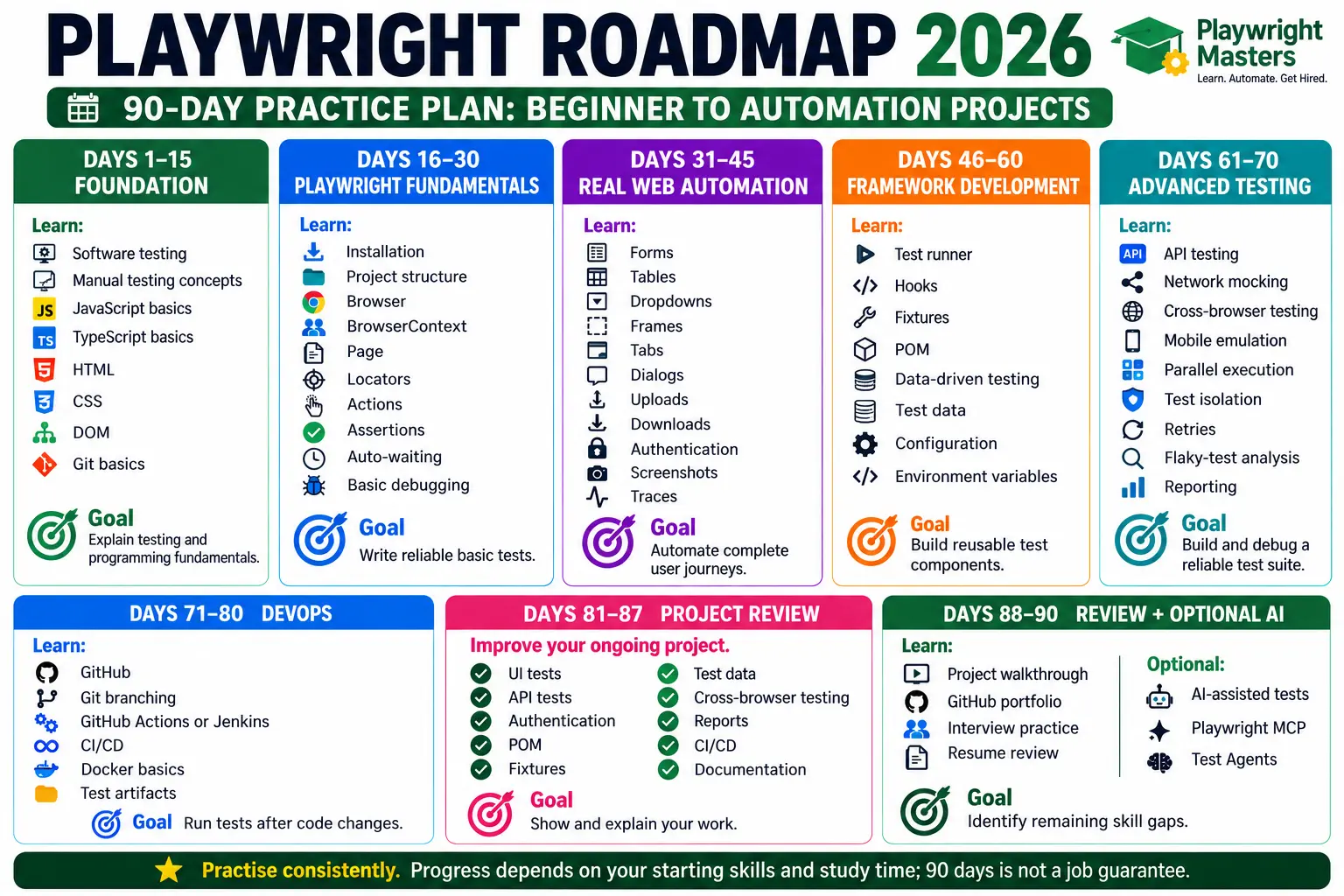
Choose your starting stage by checking your current skills. Beginners should start with testing and JavaScript fundamentals. Manual testers can focus on programming and browser automation. Selenium testers can concentrate on Playwright locators, isolation and fixtures.
Move forward when you can complete a small task without copying the solution. Use the checkpoints below to identify what still needs practice.
Track progress with evidence: a passing test, an explained failure, a reusable component or a successful CI run. A completed video is useful study time, but a working exercise shows whether you can apply the topic.
For a module-by-module checklist, use the Playwright syllabus. Keep interview revision for Stage 41, after you have a project to discuss.
What Is the Playwright Roadmap?
A Playwright roadmap is a staged learning plan: establish testing and programming foundations, write reliable browser tests, organize reusable code, then add API coverage, CI and a portfolio project. Use the checkpoints to decide when to move on; the number of completed lessons alone does not demonstrate readiness.
Who Should Follow This Playwright Roadmap?
This roadmap is useful for:
- Freshers
- Manual testers
- QA engineers
- Selenium testers
- Automation testers
- Software developers
- SDETs
- Working IT professionals
- Career switchers
You do not have to start from zero.
For example, if you already know Selenium, you already understand many testing ideas such as locators, assertions, test cases, regression testing, browser automation and frameworks.
Your job is to learn how Playwright handles these concepts differently.
How Long Does It Take to Learn Playwright?
There is no fixed number of days for everyone.
Your learning speed depends on your programming knowledge, testing experience and daily practice time.
A practical target is:
Learner | Approximate Learning Time |
Complete beginner | 3–5 months |
Manual tester | 2–4 months |
Tester with JavaScript knowledge | 2–3 months |
Selenium automation tester | 1.5–3 months |
Experienced automation engineer | 1–2 months for Playwright-specific skills |
These are learning estimates, not job guarantees.
The important question is not:
“How many days did I study Playwright?”
The better question is:
“Can I build, debug, maintain and explain a Playwright framework?”
The Complete Playwright Roadmap
Here is the complete learning journey.
Stage 1: Learn Software Testing Fundamentals
Before learning Playwright, understand testing.
You should know:
- What is software testing?
- What is a test case?
- What is a test scenario?
- What is a bug?
- What is regression testing?
- What is smoke testing?
- What is sanity testing?
- What is functional testing?
- What is integration testing?
- What is end-to-end testing?
- What is test data?
- What is severity?
- What is priority?
- What is SDLC?
- What is STLC?
Early practice: Write positive, negative and boundary cases before automating a login form. Start a Git repository for your exercises and commit working changes from the foundation phase. Stages 29 and 34 develop these skills further.
Why learn testing before Playwright?
Imagine someone gives you a robot.
The robot can click buttons.
But you do not know which buttons should be tested.
The robot is not the problem.
The testing knowledge is missing.
Playwright is your automation tool.
Testing knowledge tells you what to automate and why.
Your checkpoint
Move to the next stage when you can take a simple application and identify:
- What should be tested
- What should not be tested
- Which tests are repetitive
- Which tests are important
- Which tests should be automated first
Stage 2: Learn JavaScript or TypeScript
Playwright supports multiple programming languages.
You can work with:
- JavaScript
- TypeScript
- Python
- Java
- .NET
For the Playwright Test ecosystem, JavaScript and TypeScript are especially useful choices.
If you are a beginner, start with the basics instead of trying to learn the entire programming language.
Learn:
JavaScript basics
- Variables
- Data types
- Operators
- Conditions
- Loops
- Functions
- Arrays
- Objects
- Classes
- Modules
- Import/export
- Error handling
Then learn the most important asynchronous concepts:
- Promise
- async
- await
Why is async/await important?
A browser needs time to perform actions.
For example:
- Open a page.
- Wait for the page.
- Find a button.
- Click it.
- Wait for the result.
- Check the result.
async and await help you work with these asynchronous operations.
TypeScript
After JavaScript basics, learn:
- Types
- Interfaces
- Type annotations
- Optional properties
- Enums
- Generics basics
- Type inference
You do not need to become a TypeScript expert before writing your first Playwright test.
JavaScript checkpoint
You should be able to read something like:
const username = "testuser";

async function login() {
    await page.getByLabel("Username").fill(username);
}
and understand what it is doing.
Stage 3: Understand HTML, CSS and the DOM
This stage is often ignored.
Do not skip it.
A Playwright test interacts with elements inside a web page.
So you should understand:
- HTML tags
- Attributes
- IDs
- Classes
- Buttons
- Links
- Input fields
- Forms
- Tables
- Lists
- DOM
- CSS selectors
- Basic XPath
For example:
<button id="login">Login</button>You should understand what the button and id represent.
Why does DOM knowledge matter?
Suppose your test cannot find a button.
Without DOM knowledge, you may randomly try selectors.
With DOM knowledge, you can inspect the page and choose a better locator.
Your checkpoint
Open a website in browser developer tools.
Pick five elements.
Identify:
- Tag
- Text
- Role
- Attribute
- ID
- Class
If you can do this comfortably, continue.
Stage 4: Install Playwright
At this stage, set up one JavaScript or TypeScript project and run its generated example test. Follow the installation guide for prerequisites, commands and setup troubleshooting. The next stage uses the first-test tutorial to write your own test.
Checkpoint: explain what the configuration and test files do, and run a selected test from the terminal. Continue only after setup works consistently.
For guided support, view the Playwright course.
Understand the project structure
You should know what these files and folders do:
playwright-project/
│
├── tests/
├── playwright.config.ts
├── package.json
├── test-results/
└── playwright-report/
Do not just memorize the folder names.
Understand why they exist.
Stage 5: Write Your First Playwright Test
Write a small test that opens a page and verifies an expected result. Follow the first-test walkthrough if you need a worked example.
Checkpoint: create a second test without copying the first verbatim, run it, and explain the fixture, action and assertion. Deliberately change the expected result so you can recognize a meaningful failure.
Stage 6: Master Locators
Locators are one of the most important Playwright skills.
A locator tells Playwright:
“Find this element.”
Learn:
- getByRole()
- getByLabel()
- getByText()
- getByPlaceholder()
- getByTestId()
- locator()
- Filtering
- Chaining
- Parent-child relationships
A strong locator usually describes the element the way a user understands it.
For example:
page.getByRole('button', { name: 'Login' })
is often easier to understand than a long CSS path.
Locator rule
Do not choose a locator because it is the shortest.
Choose it because it is stable, readable and meaningful.
Playwright’s official best practices recommend user-facing locators and explicit contracts, with auto-waiting and retryability built into locators.
Reference: official Playwright best practices.
Practice task
Take one login page.
Create locators for:
- Username
- Password
- Login button
- Forgot password
- Page heading
Then intentionally change the page slightly.
Ask:
Which locators survive the change?
That is how you learn locator strategy instead of memorizing syntax.
Stage 7: Learn Actions
Once Playwright can find an element, learn how to interact with it.
Learn:
- click
- fill
- check
- uncheck
- selectOption
- hover
- press
- drag and drop
- upload
- download
Example:
await page.getByLabel('Email').fill('test@example.com');
await page.getByLabel('Password').fill('Password123');
await page.getByRole('button', { name: 'Login' }).click();
Your goal is to automate complete user actions.
Stage 8: Master Assertions
Automation is useless if it only performs actions.
A good test must also verify the result.
Learn:
- toBeVisible()
- toBeHidden()
- toHaveText()
- toContainText()
- toHaveValue()
- toBeEnabled()
- toBeDisabled()
- toHaveURL()
- toHaveTitle()
- toHaveAttribute()
Think of a test like this:
Action → Expected Result
Example:
await page.getByRole('button', { name: 'Login' }).click();
await expect(page.getByRole('heading', { name: 'Dashboard' }))
    .toBeVisible();
The first line performs an action.
The second line checks the result.
Stage 9: Understand Auto-Waiting
This is one of the concepts that separates Playwright from simple browser scripting.
A web page does not always respond instantly.
A button may:
- appear later
- become enabled later
- move
- load after an API request
- change its text
- become visible after an animation
Playwright’s locator-based actions perform actionability checks and automatically wait for elements to become ready.
That means you should not blindly add:
waitForTimeout()
everywhere.
Bad mindset
“Wait two seconds and hope the page is ready.”
Better mindset
“Wait for the application state I actually need.”
This produces more reliable tests.
Stage 10: Learn Browser, Context and Page
Understand this simple model:
Browser → BrowserContext → Page
Think of a browser like a building.
A BrowserContext is like a separate room.
A Page is like a screen inside that room.
Different contexts can keep sessions isolated.
Learn:
- Browser
- BrowserContext
- Page
- Multiple contexts
- Context isolation
- Cookies
- Local storage
- Session state
This becomes extremely important when you start handling authentication and parallel testing.
Stage 11: Learn Forms and Real Web Elements
Now move beyond simple buttons.
Practice:
- Text fields
- Radio buttons
- Checkboxes
- Dropdowns
- Date pickers
- Tables
- Search boxes
- Dynamic lists
- Autocomplete fields
- Sliders
- Menus
- Tooltips
Build tests around complete workflows.
For example:
Search → Select Product → Add to Cart → Checkout → Verify Order
This is much better practice than writing 20 unrelated button-click tests.
Stage 12: Learn Frames and Multiple Pages
Real applications can contain iframes and multiple tabs.
Learn:
- Frames
- Iframes
- Multiple pages
- New tabs
- Popups
- Browser events
- Dialogs
Practice a flow like:
Open website → click payment link → new page opens → verify content
You should understand how Playwright handles the new page instead of trying to treat it like the original page.
Stage 13: Learn Authentication
Authentication is a major real-world automation skill.
Learn:
- Login
- Cookies
- Sessions
- Local storage
- Authentication state
- Token-based authentication
- JWT basics
- OAuth concepts
- Reusing logged-in state
A professional test suite should not necessarily perform a full login from scratch for every test.
Learn how to reuse authenticated state safely.
Protect authentication state: Saved state may contain sensitive cookies and tokens. Keep it out of Git, use test accounts and refresh expired state. Parallel tests that modify shared server-side data need isolated accounts or data. Follow the official authentication guidance.
Checkpoint: Run two authenticated tests independently without committing credentials or depending on execution order.
Stage 14: Learn File Upload and Download
Modern applications often use files.
Practice:
- Uploading images
- Uploading documents
- Downloading files
- Checking downloaded files
- Validating file names
- Validating file content
Example business flow:
Create profile → upload resume → save → download resume → verify file
This gives you useful real-world practice.
Stage 15: Learn Screenshots, Video and Trace Viewer
When a test fails, the most important question is:
“What happened?”
Learn how to collect evidence.
Practice:
- Screenshots
- Videos
- HTML reports
- Trace Viewer
- Console errors
- Network information
- Test logs
Trace Viewer is especially useful because it helps you inspect what happened during a failed test.
Do not learn debugging only after your framework breaks.
Learn debugging while building your first serious project.
Stage 16: Master the Playwright Test Runner
Now understand the test runner properly.
Learn:
- test()
- expect()
- describe()
- Hooks
- Fixtures
- Tags
- Annotations
- Retries
- Timeouts
- Projects
- Test filtering
- Configuration
- Reporters
Playwright’s CLI can run individual tests, test groups, projects, debug sessions, UI mode and reports.
For example:
npx playwright test
Run a specific file:
npx playwright test tests/login.spec.ts
Debug:
npx playwright test --debug
View the report:
npx playwright show-report
Stage 17: Learn Hooks
Learn:
beforeAll
afterAll
beforeEach
afterEach
Hooks are useful for setup and cleanup.
But do not put the entire test inside hooks.
A test should remain easy to understand.
If a reader opens the test file, they should quickly understand:
What is being tested?
Stage 18: Learn Fixtures
Learn built-in fixtures, custom fixtures, fixture scope, reusable setup, dependencies and environment setup. Read our detailed Playwright Fixtures guide to understand how Fixtures work in real automation frameworks.
Learn:
- Built-in fixtures
- Custom fixtures
- Fixture scope
- Reusable setup
- Test dependencies
- Environment setup
Instead of repeating the same setup in many tests, fixtures can provide reusable functionality.
Stage 19: Learn Page Object Model
Now you are ready for framework design.
Page Object Model, or POM, helps organize page-related actions and locators.
For example:
pages/
├── LoginPage.ts
├── HomePage.ts
├── ProductPage.ts
└── CheckoutPage.ts
A LoginPage might contain:
login()
enterUsername()
enterPassword()
Important warning
Do not create POM just because everyone says:
“Use POM.”
Understand why you are using it.
A good framework should reduce duplication and improve maintainability.
A bad POM can create hundreds of unnecessary methods and make the framework harder to understand.
Stage 20: Learn Data-Driven Testing
Do not write the same test ten times for ten users.
Separate:
Test logic
from:
Test data
Learn:
- Arrays
- JSON
- CSV
- Environment variables
- Test data factories
- Parameterized tests
Example:
User 1 → Valid login
User 2 → Invalid password
User 3 → Locked account
User 4 → Expired password
The test structure can remain the same while the data changes.
Stage 21: Learn API Testing with Playwright
This is where your Playwright skills become much more powerful.
Learn:
- GET
- POST
- PUT
- PATCH
- DELETE
- Headers
- Query parameters
- Request body
- Authentication
- Response validation
- Status codes
- JSON validation
Why learn API testing?
Because sometimes testing through the UI is slow.
You may be able to create test data through an API and then verify the result through the UI.
For example:
API creates customer → UI opens customer → UI verifies customer
That is a powerful hybrid test.
Stage 22: Master Network Interception and API Mocking
Modern applications depend heavily on APIs.
Learn:
- Request interception
- Response mocking
- Route handling
- Network failures
- Slow responses
- Error responses
For example:
What happens if the payment API returns:
500 Internal Server Error
Your application should show an appropriate message.
Playwright can help you test these scenarios without depending entirely on a real backend.
Stage 23: Learn Cross-Browser Testing
Playwright supports:
- Chromium
- Firefox
- WebKit
Do not assume:
“If it works in Chrome, it works everywhere.”
Test important flows across browsers.
Example:
Chrome → Login → Purchase → Pass
Firefox → Login → Purchase → Pass
WebKit → Login → Purchase → Pass
Cross-browser testing is especially important for customer-facing web applications.
Stage 24: Learn Mobile and Device Emulation
Playwright can emulate mobile browser environments.
Learn:
- Mobile viewport
- Device profiles
- Touch
- Geolocation
- Permissions
- Browser settings
- Responsive layouts
Remember:
Mobile browser testing is not the same as native mobile application testing.
Playwright is primarily a web automation tool.
Stage 25: Learn Parallel Testing
A large test suite can become slow.
Imagine:
100 tests × 1 minute
Running everything one after another can take a long time.
Parallel execution allows independent tests to run at the same time.
Learn:
- Workers
- Parallel execution
- Test isolation
- Projects
- Sharding
But remember:
More parallelism does not automatically mean better testing.
Tests must be designed so they do not depend on one another.
Stage 26: Learn Test Isolation
A professional test should not secretly depend on another test.
For example:
Bad:
Test 1 creates user
Test 2 assumes user exists
Test 3 assumes Test 2 passed
If Test 1 fails, the entire chain can collapse.
Better:
Test 1 → independent
Test 2 → independent
Test 3 → independent
Learn how browser contexts, test data and fixtures help maintain isolation.
Stage 27: Master Test Retries and Handle Flaky Tests
A flaky test sometimes passes and sometimes fails without a real application change.
Do not solve every flaky test by increasing retries.
Ask:
Why is it flaky?
Possible causes include:
- Weak locators
- Race conditions
- Bad test data
- Shared state
- External dependencies
- Network instability
- Application timing problems
Retries can help diagnose transient failures, but they should not hide broken tests.
Stage 28: Learn Reporting
A professional team needs useful test results.
Learn:
- HTML reports
- JUnit reports
- JSON reports
- Screenshots
- Videos
- Traces
- Failed-test artifacts
Your report should help answer:
What failed?
Where did it fail?
Why did it fail?
Can I reproduce it?
Stage 29: Learn Git and GitHub
Playwright without version control is not enough for professional work.
Learn:
- git init
- git clone
- git add
- git commit
- git pull
- git push
- branches
- merge
- pull requests
- .gitignore
Then create a public or private portfolio repository containing your automation project.
Your GitHub repository can demonstrate more than a certificate.
It can show:
- Code quality
- Framework structure
- Test design
- Documentation
- CI execution
- Problem-solving
Stage 30: Learn CI/CD
This is one of the biggest differences between:
“I know Playwright.”
and
“I can confidently use Playwright in real-world software projects.”
Learn:
- GitHub Actions
- Jenkins
- GitLab CI
- Azure DevOps
- Pipeline basics
- Environment variables
- Browser installation
- Test reports
- Artifacts
- Failure notifications
A basic pipeline can look like:
Developer pushes code
↓
CI starts
↓
Install dependencies
↓
Install Playwright browsers
↓
Run tests
↓
Generate report
↓
Store failure evidence
Playwright provides official CI guidance and examples for running browser tests in CI environments.
Follow the official CI guide. Start with one CI provider. Checkpoint: A push runs your suite and preserves a report and failure trace for review.
Stage 31: Learn Docker Basics
Docker becomes useful when you need consistent environments.
Learn:
- What is Docker?
- Image
- Container
- Dockerfile
- Volumes
- Environment variables
- Basic networking
You do not need to become a DevOps engineer.
You only need enough Docker knowledge to understand how your Playwright tests can run consistently in controlled environments.
Stage 32: Learn Accessibility Testing
Accessibility should not be treated as an optional extra.
Learn basic concepts such as:
- Accessible names
- Roles
- Labels
- Keyboard navigation
- Focus
- ARIA
- Screen-reader-friendly elements
There is also a useful connection between accessibility and locator strategy.
A user-facing locator is often more meaningful than a fragile CSS path.
Stage 33: Learn Visual Testing
Functional tests answer:
“Does the application behave correctly?”
Visual tests can answer:
“Does the application look correct?”
Learn:
- Screenshot comparison
- Visual baselines
- Thresholds
- Component visual testing
- Full-page visual testing
Use visual testing carefully.
Not every pixel difference is a real defect.
Stage 34: Learn Test Design
Now stop thinking only about Playwright commands.
Start thinking about test strategy.
Learn:
- Positive testing
- Negative testing
- Boundary testing
- Equivalence partitioning
- Risk-based testing
- Regression testing
- Smoke testing
- End-to-end testing
- Test pyramid concepts
For example, a login test should not only check:
Correct username + correct password
Also consider:
- Wrong password
- Empty username
- Empty password
- Locked user
- Expired password
- Invalid email
- Session timeout
This is what makes automation useful.
Stage 35: Build Your First Real-World Playwright Project
Do not build only a calculator.
Build something that looks like a real business application.
Good project ideas include:
Project 1: E-commerce
Automate:
Login
↓
Search product
↓
Filter product
↓
Open product
↓
Add to cart
↓
Checkout
↓
Payment validation
↓
Order confirmation
Project 2: Banking
Automate:
Login
↓
Account summary
↓
Transaction history
↓
Fund transfer
↓
Validation
↓
Logout
Project 3: Healthcare
Automate:
Login
↓
Search doctor
↓
Select appointment
↓
Choose date
↓
Book appointment
↓
Verify confirmation
Project 4: Travel
Automate:
Search destination
↓
Select dates
↓
Select passengers
↓
Search
↓
Choose flight
↓
Verify booking
The project should contain both:
working tests
and
good framework structure.
Starter exercise: Practise creating, completing, deleting and filtering items in Playwright’s TodoMVC demo. Add an empty-input case and a persistence check. Use a local or authorised test application with documented API endpoints for a larger portfolio project.
Portfolio acceptance criteria: Include positive, negative and boundary cases; independent tests and cleanup; no committed secrets; reproducible install/run commands; a CI workflow; and an explained failure trace. A reviewer should be able to run the repository using its README. Add API checks where the chosen application provides a suitable test API.
Stage 36: Build a Professional Framework
Combine the skills from the earlier stages into a reusable suite. Follow the Playwright framework implementation guide, and use the architecture guide to decide where responsibilities belong.
Checkpoint: add a new scenario using existing components, run it independently, and explain setup, cleanup and test-data ownership. Another person should be able to run the project from its README.
Stage 37: Learn AI-Assisted Playwright Testing
This is an important part of the modern 2026 roadmap.
But learn AI after you understand testing and Playwright.
Do not allow AI to become your replacement for testing knowledge.
Use AI to improve productivity.
You can use AI for:
- Test-case ideas
- Test-data generation
- Code explanation
- Debugging suggestions
- Refactoring ideas
- Documentation
- Locator suggestions
- Test generation
- Failure analysis
Playwright now also has official tooling around AI-assisted browser workflows, including Playwright Test Agents and Playwright MCP.
The official Test Agents include Planner, Generator and Healer workflows.
The Planner can explore an application and create a test plan.
The Generator can turn that plan into Playwright tests.
The Healer can inspect failing tests and suggest or apply fixes under its defined workflow and guardrails.
Read the official Test Agents guide. Review generated assertions and changes before accepting them; passing tests alone do not prove useful coverage.
Stage 38: Learn Playwright MCP
MCP stands for:
Model Context Protocol
Playwright MCP allows an AI system to interact with websites using Playwright browser automation.
Instead of the AI simply guessing what is on a page, Playwright MCP can work with structured accessibility information.
This creates interesting workflows such as:
Requirement
↓
AI explores application
↓
Test scenario
↓
Playwright automation
↓
Execution
↓
Failure analysis
The official Playwright documentation describes MCP as a browser automation server that lets LLMs interact with web pages through structured accessibility snapshots.
Source: Microsoft Playwright MCP repository.
Stage 39: Learn Playwright CLI for AI Workflows
Stage 16 covers the Playwright Test runner, such as npx playwright test --debug. This optional stage covers separate Playwright CLI browser tooling for coding agents.
Agent browser commands let an assistant inspect and interact with a browser; they do not replace a maintained test suite. MCP exposes browser tools through a server. Choose the integration supported by your agent and review its permissions.
Checkpoint: Explain which tool runs your tests and which enables agent browser interaction. Review and run generated tests yourself.
Stage 40: Learn How to Debug Like an Engineer
This is a crucial skill for building a successful career.
When a test fails, do not immediately change the code.
Ask:
Question 1
Did the application fail?
Question 2
Did the test fail?
Question 3
Did the locator fail?
Question 4
Did the test data fail?
Question 5
Did the environment fail?
Question 6
Is the failure reproducible?
Then use:
- Trace Viewer
- Screenshots
- Video
- Logs
- Browser console
- Network information
- CI artifacts
A good automation engineer does not simply make the red test green.
They find the reason it became red.
Stage 41: Prepare for Playwright Interviews
Once you can build a project, prepare for interviews.
Study:
Beginner questions
- What is Playwright?
- Why is Playwright used?
- What browsers does it support?
- What is a locator?
- What is auto-waiting?
- What is an assertion?
- How do you install Playwright?
Intermediate questions
- What is BrowserContext?
- What are fixtures?
- What is Page Object Model?
- How do you handle authentication?
- How do you handle iframes?
- How do you handle multiple tabs?
- How do you perform API testing?
- How can you run tests in parallel?
Advanced questions
- How would you design a Playwright framework?
- How do you reduce flaky tests?
- How do you manage test data?
- How do you run Playwright in CI/CD?
- How do you handle authentication at scale?
- How do you design fixtures?
- How do you shard tests?
- How do you debug CI failures?
- When should you use API testing instead of UI testing?
- How would you scale a Playwright framework?
Do not memorize answers.
Be prepared to clearly explain what you built and how it works.
The 90-Day Playwright Roadmap
Study budget: Use this flexible 90-day plan for roughly 10–14 focused hours per week. This is a suggested schedule, not a completion or employment guarantee. Beginners may need longer for programming.
Start a small project in the first month and improve it throughout. Write portfolio notes and practise explaining your work each week. The last three days are for review; AI/MCP study can wait until the core project works.
If you want a simple schedule, use this.
Days 1–15: Foundation
Learn:
- Software testing
- Manual testing concepts
- JavaScript basics
- TypeScript basics
- HTML
- CSS
- DOM
- Git basics
Goal
Understand testing and programming fundamentals.
Days 16–30: Playwright Fundamentals
Learn:
- Installation
- Project structure
- Browser
- BrowserContext
- Page
- Locators
- Actions
- Assertions
- Auto-waiting
- Basic debugging
Goal
Write reliable basic tests.
Days 31–45: Real Web Automation
Learn:
- Forms
- Tables
- Dropdowns
- Frames
- Windows
- Tabs
- Dialogs
- Upload
- Download
- Authentication
- Screenshots
- Traces
Goal
Automate complete user journeys.
Days 46–60: Framework Development
Learn:
- Test runner
- Hooks
- Fixtures
- POM
- Data-driven testing
- Test data
- Configuration
- Environment variables
Goal
Turn individual tests into a reusable framework.
Days 61–70: Advanced Testing
Learn:
- API testing
- Network mocking
- Cross-browser testing
- Mobile emulation
- Parallel execution
- Test isolation
- Retries
- Flaky-test analysis
- Reporting
Goal
Build a more production-ready test suite.
Days 71–80: DevOps
Learn:
- GitHub
- Git branching
- GitHub Actions
- Jenkins
- CI/CD
- Docker basics
- Test artifacts
Goal
Run Playwright automatically after code changes.
Days 81–87: Real Project
Build one serious project.
Do not create ten small projects.
Build one project that contains:
- UI tests
- API tests
- Authentication
- POM
- Fixtures
- Test data
- Cross-browser testing
- Reports
- CI/CD
- Documentation
Goal
Create something you can show during an interview.
Days 88–90: AI + Career Preparation
Learn:
- AI-assisted test generation
- Playwright MCP
- Playwright Test Agents
- AI debugging workflows
- Resume preparation
- GitHub portfolio
- Interview questions
- Framework explanation
Goal
Review project evidence and identify remaining preparation gaps.
Playwright Roadmap for Manual Testers
If you are already a manual tester, you do not need to start exactly like a complete beginner.
Follow this route:
Manual Testing
↓
JavaScript/TypeScript Basics
↓
HTML + DOM
↓
Playwright Fundamentals
↓
Locators + Assertions
↓
Automation Scenarios
↓
Framework
↓
API Testing
↓
CI/CD
↓
Real Project
↓
Interview Preparation
Your manual testing knowledge is not wasted.
It becomes the foundation for deciding what should be automated.
Playwright Roadmap for Selenium Testers
If you already know Selenium, your roadmap can be shorter.
Focus on:
- Playwright architecture
- BrowserContext
- Page
- Locators
- Auto-waiting
- Fixtures
- Authentication state
- API testing
- Network mocking
- Trace Viewer
- Parallel execution
- Sharding
- Playwright configuration
- CI/CD
- Framework design
- Playwright-specific interview questions
Do not spend months relearning basic testing concepts you already know.
Playwright Roadmap for Freshers
If you are a fresher, use this order:
Software Testing
↓
Manual Testing
↓
JavaScript
↓
HTML + CSS + DOM
↓
Git
↓
Playwright
↓
Automation Framework
↓
API Testing
↓
CI/CD
↓
Project
↓
Interview Preparation
The biggest mistake freshers make is jumping directly into advanced framework topics.
Build the foundation first.
What NOT to Learn First
Avoid this learning order:
AI → MCP → Advanced Framework → POM → CI/CD → Locators
That is backwards.
You cannot properly judge an AI-generated test if you do not understand what a good test looks like.
A better order is:
Testing → Programming → Playwright → Test Design → Framework → CI/CD → AI
AI should make a skilled tester faster.
It should not become a substitute for understanding.
Common Playwright Learning Mistakes
Mistake 1: Memorizing commands
Knowing 100 Playwright methods does not make you a good automation engineer.
Understand the problem each method solves.
Mistake 2: Using fragile locators
A locator that works today may break after a small UI change.
Prefer stable, meaningful locators.
Mistake 3: Using unnecessary waits
If you constantly add fixed waits, investigate why the test is not waiting correctly.
Mistake 4: Building POM too early
First understand your tests.
Then design the framework.
Mistake 5: Ignoring API testing
Modern applications depend heavily on APIs.
A strong Playwright tester should understand both UI and API workflows.
Mistake 6: Ignoring CI/CD
A test that only works on your laptop is not enough for many professional workflows.
Mistake 7: Building only demo tests
A login test is useful.
But a complete business workflow teaches much more.
Mistake 8: Using AI without checking the output
AI can generate code.
AI can also generate incorrect code.
Always review:
- Locator quality
- Assertions
- Test data
- Wait strategy
- Security
How Do You Know You Are Job-Ready?
Do not use:
“I completed the Playwright course.”
as your only measurement.
Instead ask yourself:
Can I write a test from scratch?
Can I choose a reliable locator?
Can I explain auto-waiting?
Can I debug a failed test?
Can I handle authentication?
Can I write API tests?
Can I design a POM framework?
Can I create fixtures?
Can I run tests across browsers?
Can I run tests in parallel?
Can I generate useful reports?
Can I run tests through CI/CD?
Can I explain my project architecture?
Can I explain why I made my testing decisions?
If your answer is yes, you are much closer to being job-ready.
The Best Way to Practice Playwright
Use this simple learning loop:
Learn → Write → Break → Debug → Improve → Explain
For example:
Learn
Study locators.
Write
Create five locators.
Break
Change the page.
Debug
Find which locator failed.
Improve
Replace the fragile locator.
Explain
Tell someone why your new locator is better.
That is real learning.
One Real Project Is More Valuable Than Ten Copy-Paste Projects
Suppose you create:
Project A: Login
Project B: Search
Project C: Checkout
These can be useful.
But an even better portfolio can be one complete application:
Login
↓
Search
↓
Product
↓
Cart
↓
Checkout
↓
Order
↓
API validation
↓
Report
↓
CI/CD
Now you can demonstrate how the pieces work together.
Your Final Playwright Learning Checklist
Use this checklist before calling yourself an advanced Playwright tester.
Foundation
- Software testing
- Manual testing
- JavaScript
- TypeScript
- HTML
- CSS
- DOM
- Git
Playwright Core
- Installation
- Project structure
- Browser
- BrowserContext
- Page
- Locators
- Actions
- Assertions
- Auto-waiting
Web Automation
- Forms
- Tables
- Dropdowns
- Frames
- Tabs
- Windows
- Dialogs
- Upload
- Download
- Authentication
Framework
- Test runner
- Hooks
- Fixtures
- POM
- Test data
- Configuration
- Environment management
Advanced
- API testing
- Network mocking
- Cross-browser testing
- Mobile emulation
- Parallel execution
- Test isolation
- Retries
- Flaky-test analysis
- Reporting
- Trace Viewer
DevOps
- GitHub
- GitHub Actions
- Jenkins
- CI/CD
- Docker
Modern Playwright
- AI-assisted testing
- Playwright MCP
- Playwright CLI
- Playwright Test Agents
- AI-generated test review
Career
- Real project
- GitHub portfolio
- Resume
- Playwright interview questions
- Framework explanation
- Mock interview
Ready to follow this roadmap with structured guidance? Check our Playwright Automation Testing Course in Hyderabad for the complete learning path and training options.
Frequently Asked Questions About the Playwright Roadmap
What is the best Playwright roadmap for beginners?
Start with software testing, JavaScript or TypeScript, HTML/DOM basics, Playwright fundamentals, locators, actions, assertions and auto-waiting. Then move to framework development, API testing, CI/CD, projects and interviews.
Can I learn Playwright without learning Selenium?
Yes.
You do not need to learn Selenium before Playwright.
If you are starting from zero, learn software testing and programming fundamentals first.
Can a manual tester learn Playwright?
Yes.
Manual testers already have a strong foundation in testing concepts. The next step is to build programming skills, learn browser automation, and master Playwright.
Is JavaScript required for Playwright?
No.
Playwright works with JavaScript, TypeScript, Python, Java, and .NET.
For the best experience with the Playwright Test ecosystem, JavaScript or TypeScript is often a great option.
Should I learn JavaScript or TypeScript?
Both work.
JavaScript can feel simpler when starting.
TypeScript adds type checking and can be useful for larger automation projects.
How many months does it take to learn Playwright?
A beginner may need around three to five months of consistent study and practice. Someone with automation experience may progress faster.
The actual time depends on your background and practice.
Is Playwright difficult to learn?
The basic commands are not difficult.
The challenging part is learning how to build reliable, maintainable automation.
That is why you should learn testing, programming, locator strategy, framework design and debugging—not only commands.
Is Playwright good for automation testing?
Yes.
Playwright provides browser automation, assertions, test isolation, parallel execution, cross-browser testing, debugging tools, reporting and CI capabilities.
Can Playwright do API testing?
Yes.
Playwright provides API request capabilities that can be used to test backend services and combine API and UI workflows.
Can Playwright replace manual testing?
No.
Automation can reduce repetitive manual work, but human testing remains important for exploratory testing, usability, product understanding and scenarios that are difficult to automate.
Can Playwright be used with CI/CD?
Yes.
Playwright tests can be integrated into CI environments such as GitHub Actions, Jenkins, GitLab CI and other CI systems.
Can Playwright test mobile applications?
Playwright supports mobile browser/device emulation for web applications.
It is not a replacement for native Android or iOS application automation.
What Project Should You Build After Learning Playwright?
Build a real business workflow such as:
- E-commerce
- Banking
- Healthcare
- Travel
- SaaS
Your project should include UI testing, API testing, framework design, reports and CI/CD.
What should I learn after Playwright?
After the core Playwright skills, strengthen:
Framework Design → API Testing → CI/CD → Docker → Cloud → AI-Assisted Testing → Quality Engineering
Final Playwright Roadmap
Choose your starting phase, finish its practice task and retain evidence of what you built. Progress through foundations, reliable tests, reusable components, API coverage and CI before optional AI workflows.
Practise explaining what you tested, why your assertions matter, how you isolate data and how you investigate failures. Return to the checklist when you find a gap; completing a calendar is not a job guarantee.
Rakesh G | Playwright Masters
Author | Playwright learning resources
Playwright Masters is a dedicated automation testing training platform focused on helping learners build practical skills in Playwright automation testing. Our training covers real-world automation concepts, framework practices, coding, debugging, API testing, cross-browser testing, CI/CD, and interview preparation to help learners develop job-ready testing skills.